
Settle shared family expenses at the end of the month
Daniel and Sofia have contributed different amounts. Settlement brings the month’s explicitly shared expenses together.
- 1
- Monthly settlement includes expenses with a saved split between people.
- 2
- The view shows outstanding payments between those people.
- 3
- Recorded settlement payments affect the calculation and can be undone.
Using Budget in family life
Several people pay family costs. Adding the receipts alone does not show who should repay whom for the month.
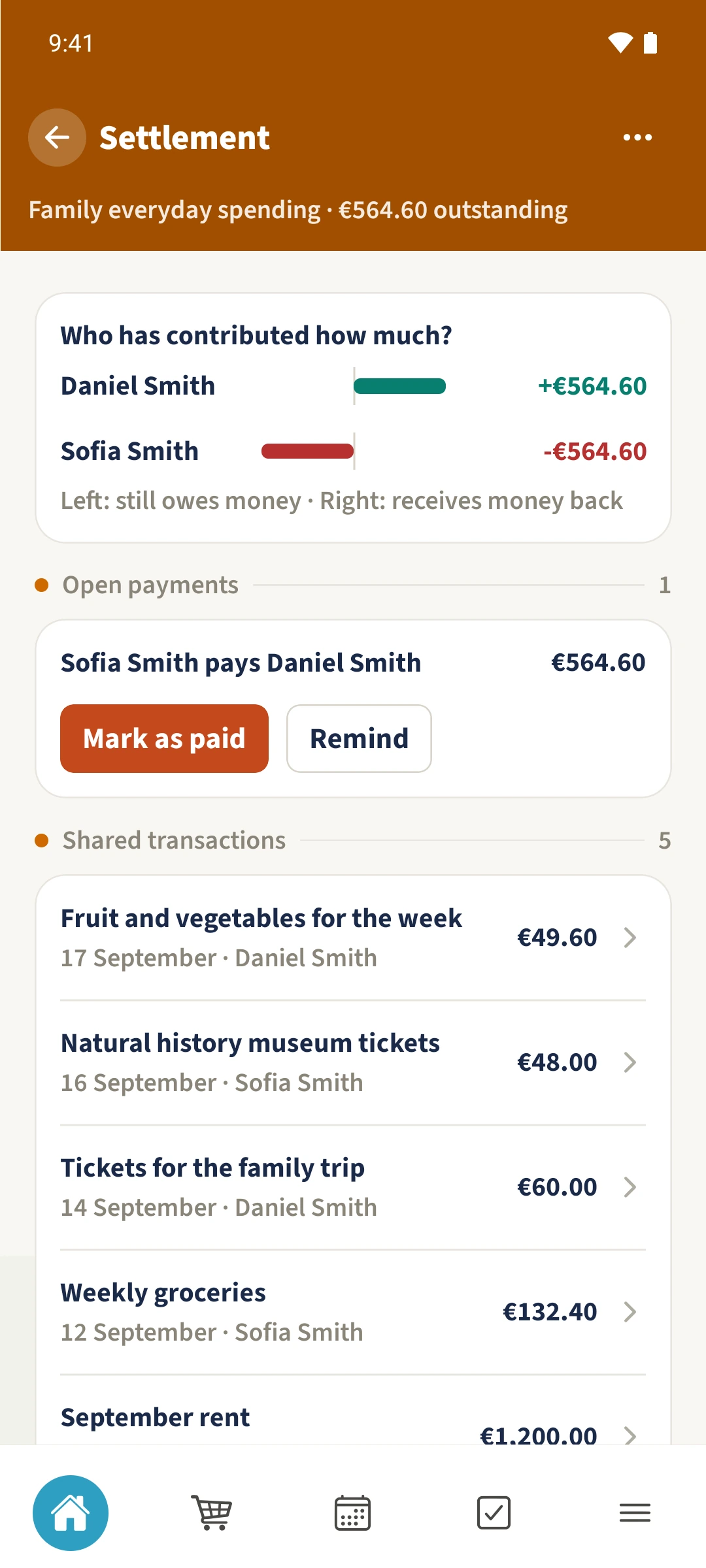
Choose the budget month and open Settlement from Plan. Check Shared transactions and the suggested amount between people. After the payment has taken place outside the app, use Mark as paid to record it. Best4Family does not transfer the money.
How the steps fit together
- 1
Check which costs are shared
Open a shared expense. Under Share costs, choose an equal split or custom amounts and select the participants. Save it before reviewing settlement.
- 2
Open the month’s settlement
Choose the budget and month, then Plan → Settlement. Review the balances and Shared transactions. In the example, five shared expenses leave Sofia owing Daniel €564.60.
- 3
Record a payment already made
Once the payment has happened outside the app, tap Mark as paid beside the correct open payment. Check the people and amount in the confirmation before accepting.
- 4
Check the updated result
The outstanding amount falls after recording the payment. A fully settled month shows All settled! Recorded payments lists the entries; tap one to undo a mistaken payment record.