Plan a monthly family budget
Make the amounts set aside for groceries, leisure and fixed costs visible in one monthly plan.
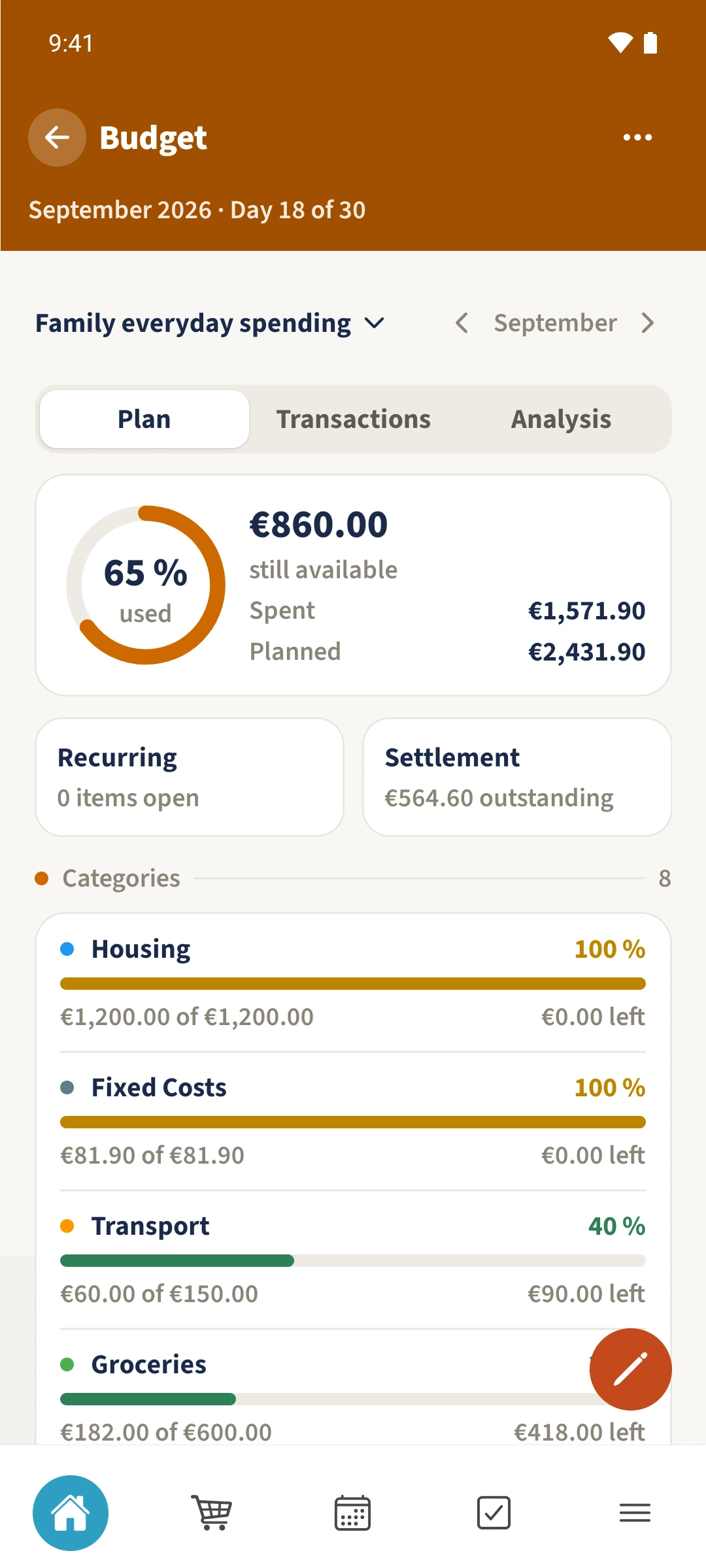
Your family plans in one place
You know individual expenses, but lack a view of the whole month and how much of your plan is still available.
 How Best4Family helps
Open More → Budget and choose the budget and month. In Plan, use the pencil icon to edit the monthly plan. Enter each category’s planned total and save. The overview compares those amounts with your recorded expenses.
Get organised in a few steps
- 01
Choose the budget and month
Open Budget. Tap its name to choose a budget, and use the month arrows to change the period. The example uses Family everyday spending for September 2026.
- 02
Open the monthly plan
Stay in Plan and tap the Edit monthly plan pencil at the bottom. The form contains a row for each budget category.
- 03
Plan the category totals
Enter the total amount you intend to spend in each category. The example plans €600 for Groceries. The €1,200 rent is already included in Housing’s total. Save the form.
- 04
Compare the plan with spending
Check Planned, Spent and still available. Each category also shows its usage. Recording an expense changes spending; editing the plan changes the amount it is compared with.