Split a restaurant bill by person
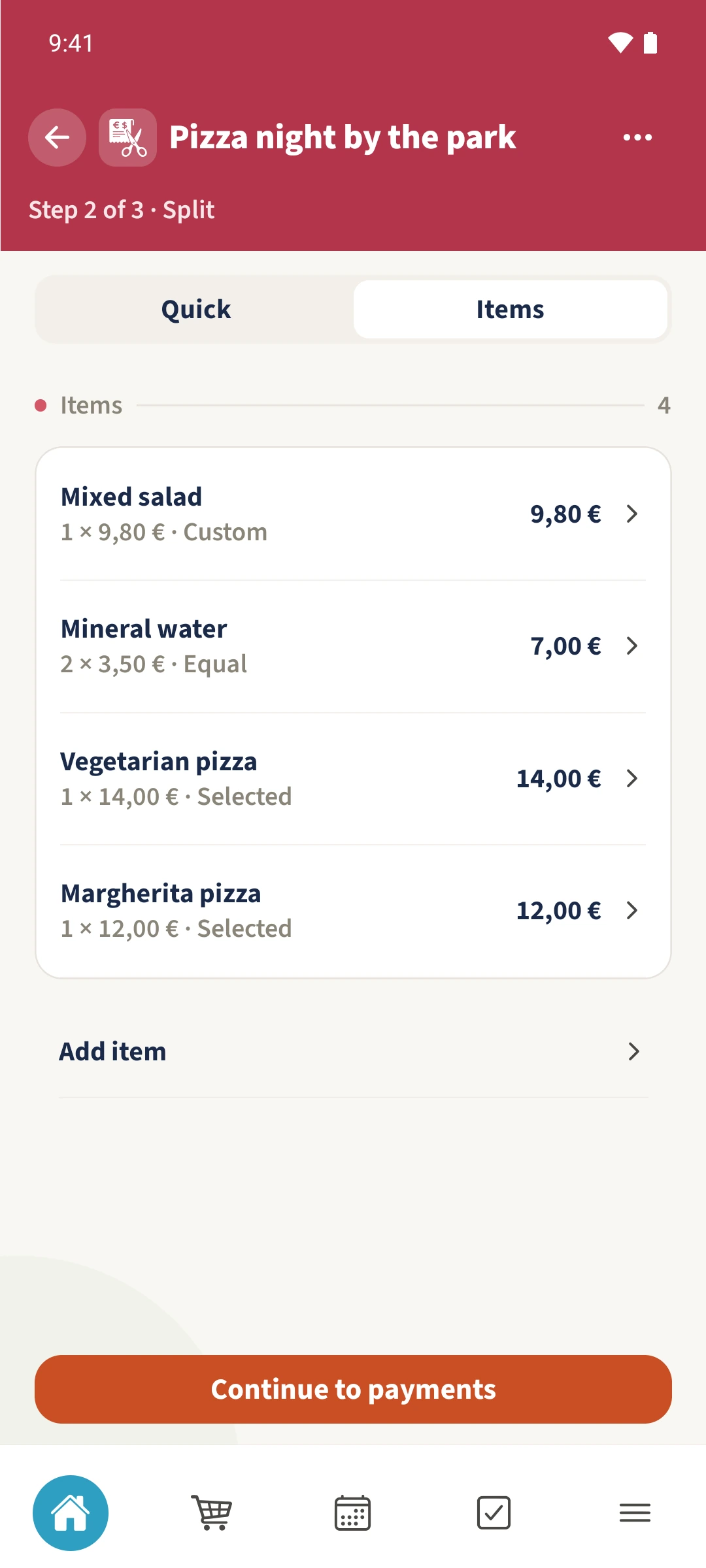
A pizza each and water for both: every item does not have to be divided among everyone.
Your family plans in one place
Splitting the whole bill equally can leave people paying for meals they did not order.
 How Best4Family helps
Open More → Bill split and create a New bill. Select the participating family members. In Split, choose Items and enter each item’s name, quantity and unit price. Selected lets you choose who bears the cost of each item.
Get organised in a few steps
- 01
Create the bill
Tap New bill. Enter a title, optional merchant, bill date and currency. Select the participants and tap Continue to split.
- 02
Enter the items
Choose Items and Add item. Enter an item name, quantity and unit price. In the example, two Mineral water at €3.50 each make a €7 item.
- 03
Assign each item
Use Equal for all active participants or Selected to choose particular people. Tap the people until only the intended participants are selected. Margherita pizza belongs entirely to Sofia in the example. Tap Apply.
- 04
Check the items and shares
Repeat for the remaining items. Tap an existing row to inspect its split. Continue to payments and then Review opens the calculation.