
See who owes whom after a shared bill
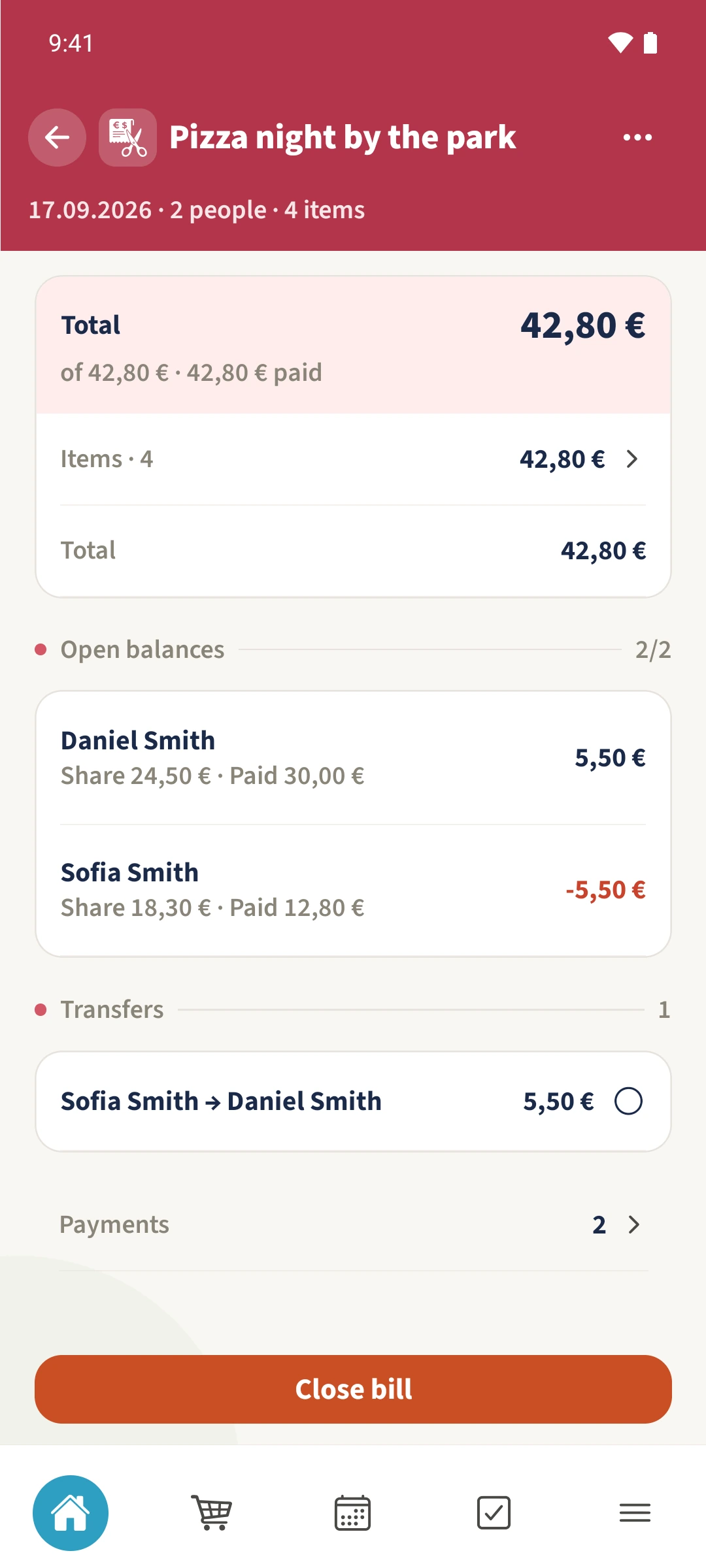
The restaurant has been paid, but Daniel paid more than his share and Sofia still owes him the difference.
- 1
- Review shows each person’s share, recorded payments and calculated balance.
- 2
- A finalised bill lets you mark calculated transfers as settled.
- 3
- Marking all proposed transfers gives the bill its settled status.
Using Bill split in family life
Paying the merchant and settling up between people are separate tasks when someone has paid more than their own share.
Open Review and compare each person’s Share and Paid amounts. Transfers shows the calculated repayment. After checking the bill, use More options → Advanced tools → Lock bill to finalise it. Then tap the relevant transfer after the repayment has taken place outside the app.
How the steps fit together
- 1
Check the calculation
Open the bill and Review. Check the items, splits and recorded payments. Daniel’s example share is €24.50 against €30 paid; Sofia’s share is €18.30 against the €12.80 equivalent she paid.
- 2
Finalise the bill
Open More options → Advanced tools. Scroll to Finalize & History, tap Lock bill and confirm Finalize. The items and their splits are then locked.
- 3
Repay outside the app
Return to Review through More options. The example transfer from Sofia Smith to Daniel Smith is €5.50. Arrange and make that payment outside Best4Family.
- 4
Record that it is settled
After the payment, tap the correct row under Transfers. It gains a tick. Once all calculated transfers are marked, the bill appears among the settled bills.