
Create your own dice for family games
A custom die can show words or actions instead of numbers.
- 1
- Custom dice sets store a name and at least two freely labelled sides.
- 2
- Sets saved beforehand are copied into new sessions.
- 3
- A session can roll the selected sets and display its saved last result.
Using Game Tools in family life
Your own game idea may need results other than the numbers one to six.
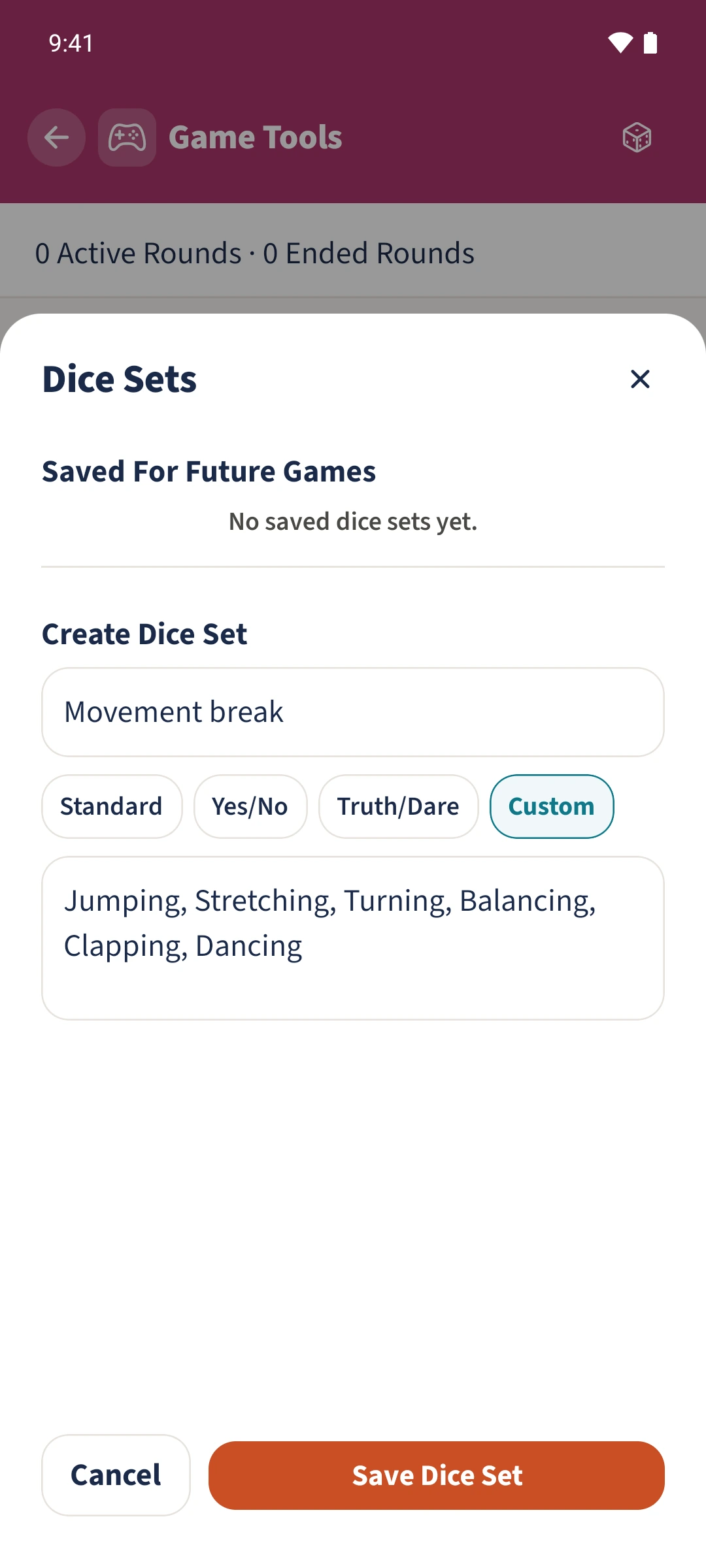
Open Dice Sets in Game Tools. Enter a name, choose Custom and provide at least two sides separated by commas or line breaks. Save the set, then start a new session. In its Dice card, set your set’s count to one and unused sets to zero. Spin / Roll chooses a random result.
How the steps fit together
- 1
Prepare a reusable set
Tap the dice icon in the session overview. Name the set Movement break and choose Custom.
- 2
Save six sides
Enter Jumping, Stretching, Turning, Balancing, Clapping, Dancing and tap Save Dice Set. The set is now available for new sessions.
- 3
Select it in a new round
Create a session after saving the set. Scroll to Dice and use plus to set Movement break to one. Set the standard die to zero with minus if you want only movement actions.
- 4
Roll and read the saved result
Tap Spin / Roll and read the selected activity. After the session ends, Sofia can open the shared session and read the saved last result too.