Keep scores for board games and family games
Keep the current score together in one shared game session.
Your family plans in one place
The score sheet goes missing or different people have written down different totals.
 How Best4Family helps
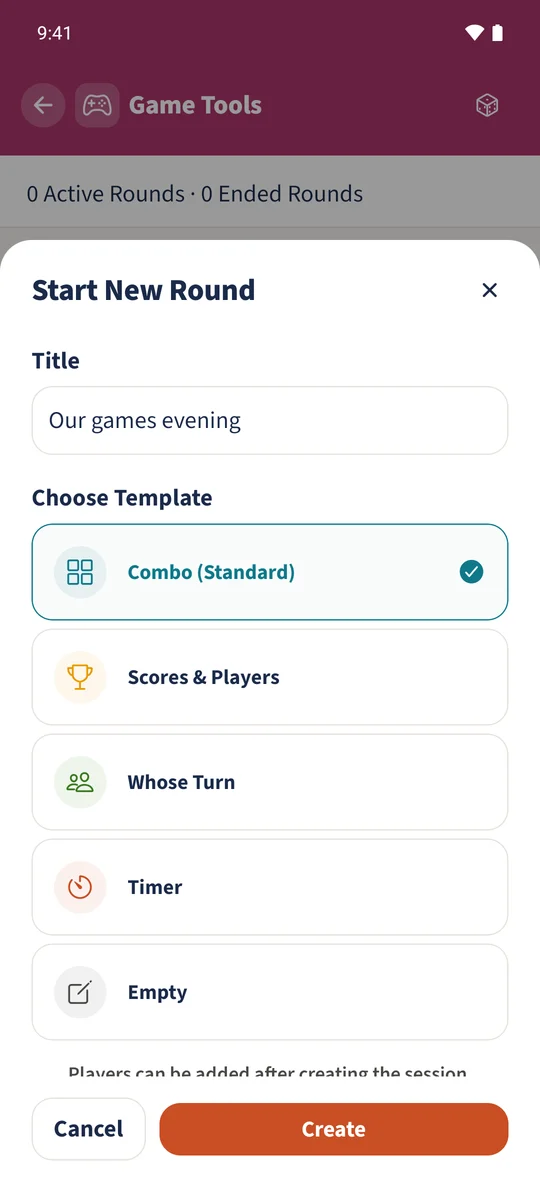
Open Game Tools, tap Start New Round and choose Scores & Players or Combo (Standard). Add family members or guests. Plus and minus change scores by the configured step; tapping a score opens Add, Subtract and Set exact. End keeps the round available to read afterwards.
Get organised in a few steps
- 01
Create a session
Enter Our games evening and choose Combo (Standard). This template also includes turn order, a timer, dice and notes. Tap Create.
- 02
Add players
Tap Add beside Players and add Daniel, Sofia and Emma from the family accounts, in that order. Add Leo through Name (Guest); he does not need his own account.
- 03
Enter the current scores
Tap Daniel’s score, choose Set exact, enter five and apply it. The example also records seven for Sofia, four for Emma and six for Leo. The separate Round counter is three.
- 04
End the session
Open Actions, choose End and confirm. The session appears under Ended Rounds. Sofia can also open it from her account and read the saved scores.