Start a family poll with clear answer options
A lakeside walk, a museum or an afternoon at home: keep the question and the family’s answers together.
Your family plans in one place
Suggestions and replies get lost between other messages, leaving the final choice unclear.
 How Best4Family helps
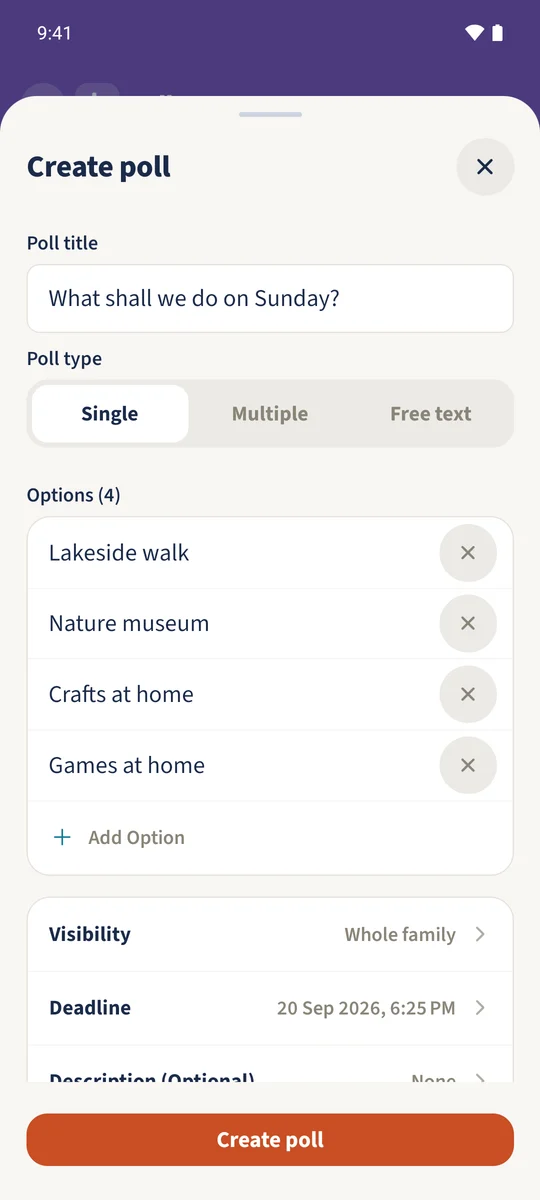
Open Polls from the module overview and tap the plus. Enter a Poll title, choose Single and add at least two options. Leave Whole family selected and tap Create poll. Each person opens the poll, chooses one option and taps Vote. The detail view then shows Results.
Get organised in a few steps
- 01
Write the question and choose the type
Open Polls and tap the plus. Write a clear Poll title and choose Single under Poll type.
- 02
Add the possible answers
Enter at least two distinct answers. Add Option creates more fields, up to ten. The example offers Lakeside walk, Nature museum, Crafts at home and Games at home.
- 03
Check visibility and deadline
Leave Whole family selected. If needed, open Deadline, choose the date and time and confirm with Done. Tap Create poll.
- 04
Vote and read the result
Open the poll, select one option and tap Vote. In the example Daniel and Sofia both choose Lakeside walk: two votes and 100 percent. While the poll remains open, you can change or remove your own vote.