
Create a reward catalog and redeem points
Agree in advance what the family can use collected points for.
- 1
- The catalog stores each reward’s title, description, point cost and category.
- 2
- Children redeem available rewards from their own account.
- 3
- An approved redemption creates a points deduction and an entry in History.
Using Kids Rewards in family life
Points remain abstract when nobody knows which rewards they can choose.
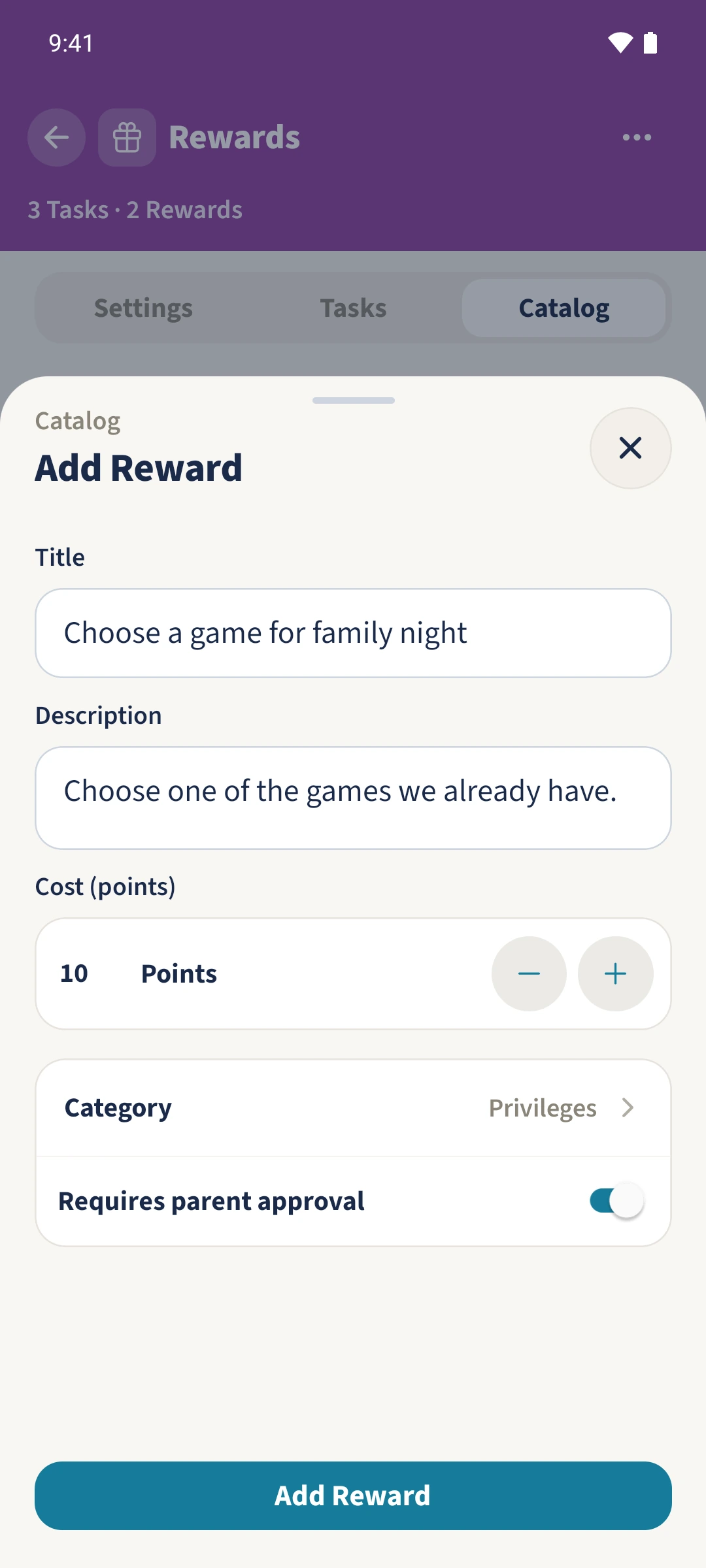
As an administrator, open Catalog in the rewards settings and choose Add Reward from the action menu. Enter its title, description, point cost and category, leaving Requires parent approval enabled. The child chooses a reward under Redeem. After approval in Inbox, the points are deducted and recorded in History.
How the steps fit together
- 1
Offer a reward
Open Settings, Catalog and Add Reward. The example adds Choose a game for family night for ten points in Privileges. Keep Requires parent approval on and save.
- 2
Choose from the child’s account
Emma opens Redeem. Choosing a film costs 15, suggesting a trip costs 40 and choosing a game costs ten. The pictured overview has 25 points available after the recorded transactions. Offers she cannot afford are greyed out.
- 3
Send and review the request
Emma taps Redeem for the film choice and confirms its cost. Daniel sees the request in Inbox and, after discussing it, chooses Approve.
- 4
Check the deduction
Emma opens History. The film choice appears with minus 15 points. Her current balance also includes the other credits in History; the pictured final state is 25 points after a later cleaning credit. Your family arranges the actual film night.