
Cook step by step with an ingredient checklist and timer
Get your ingredients ready, then concentrate on the next preparation step.
- 1
- Changing servings scales stored ingredient quantities for the current cooking session.
- 2
- Cooking mode provides an ingredient checklist and one step at a time.
- 3
- A step with a stored timer duration can start a countdown.
Using Recipes in family life
It is easy to lose your place while cooking. When fewer people are eating, the ingredient amounts need adjusting too.
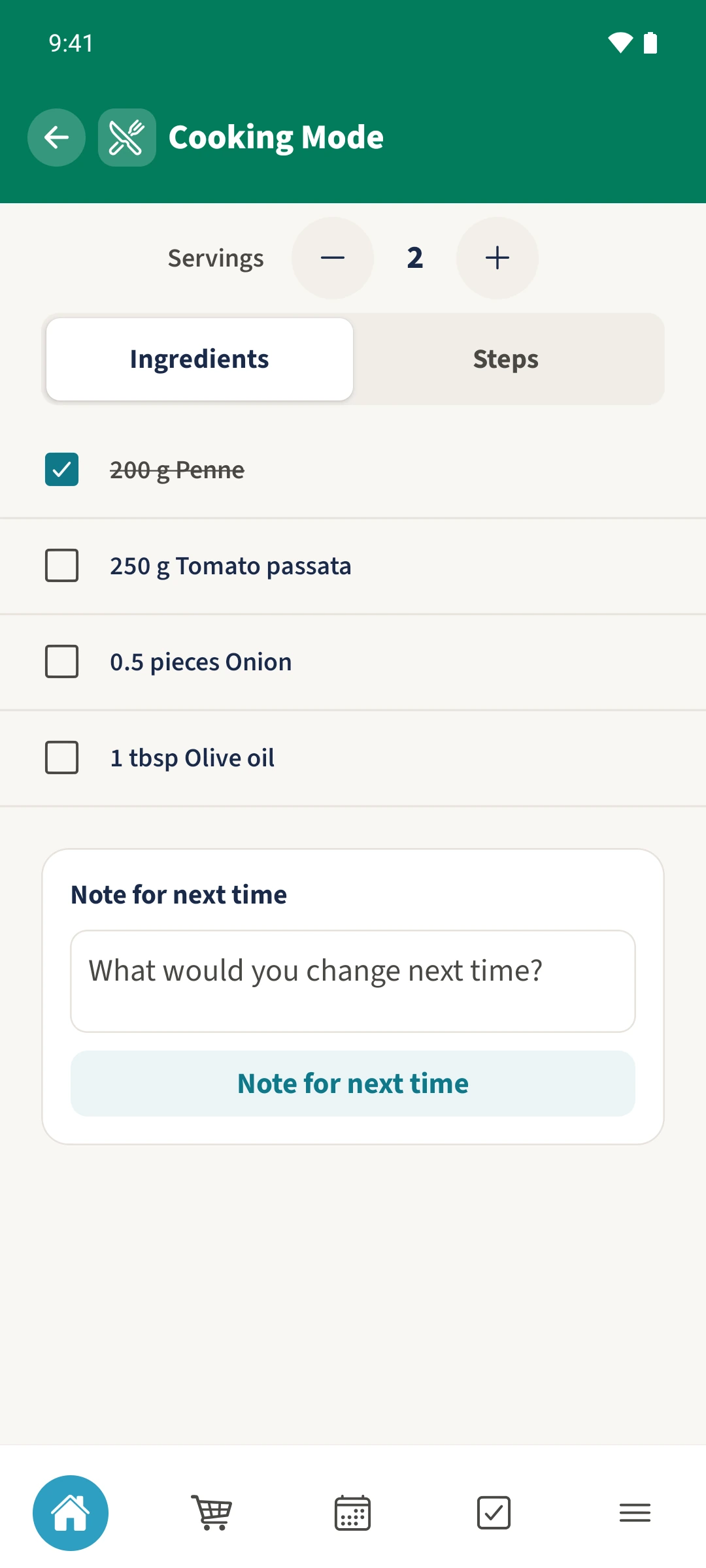
Open a recipe, expand Preparation and tap Start Cooking. Set the servings and tick off prepared ingredients under Ingredients. Switch to Steps and use Next to work through the recipe. A step with a saved duration offers Start Timer.
How the steps fit together
- 1
Open cooking mode
Open the recipe, expand Preparation and tap Start Cooking. Cooking Mode begins on the Ingredients tab.
- 2
Set servings and prepare ingredients
Use minus and plus to change the servings. In the example, reducing four servings to two changes 400 g of penne to 200 g. Tap ingredients as you get them ready.
- 3
Follow the steps and use a timer
Switch to Steps, read the current instruction and use Next to move on. If the step has a saved duration, tap Start Timer. Tap the countdown to stop it. Only change steps once you no longer need that timer.
- 4
Finish cooking
The final step offers Finish. Confirm to return to the recipe. To save a Note for next time, use the field on the Ingredients tab first; this note belongs to the shared recipe.