
Connect cleaning tasks to kids’ rewards
A completed cleaning assignment can appear in the rewards system for a parent to review.
- 1
- The enabled link mirrors cleaning templates as reward tasks.
- 2
- With Auto-approval off, completion by the assigned person creates a submission for parent review.
- 3
- The points calculation uses the multiplier, and the approved credit appears in History.
Using Cleaning Plan in family life
Keeping separate cleaning and reward tasks can leave different points and people attached to the same work.
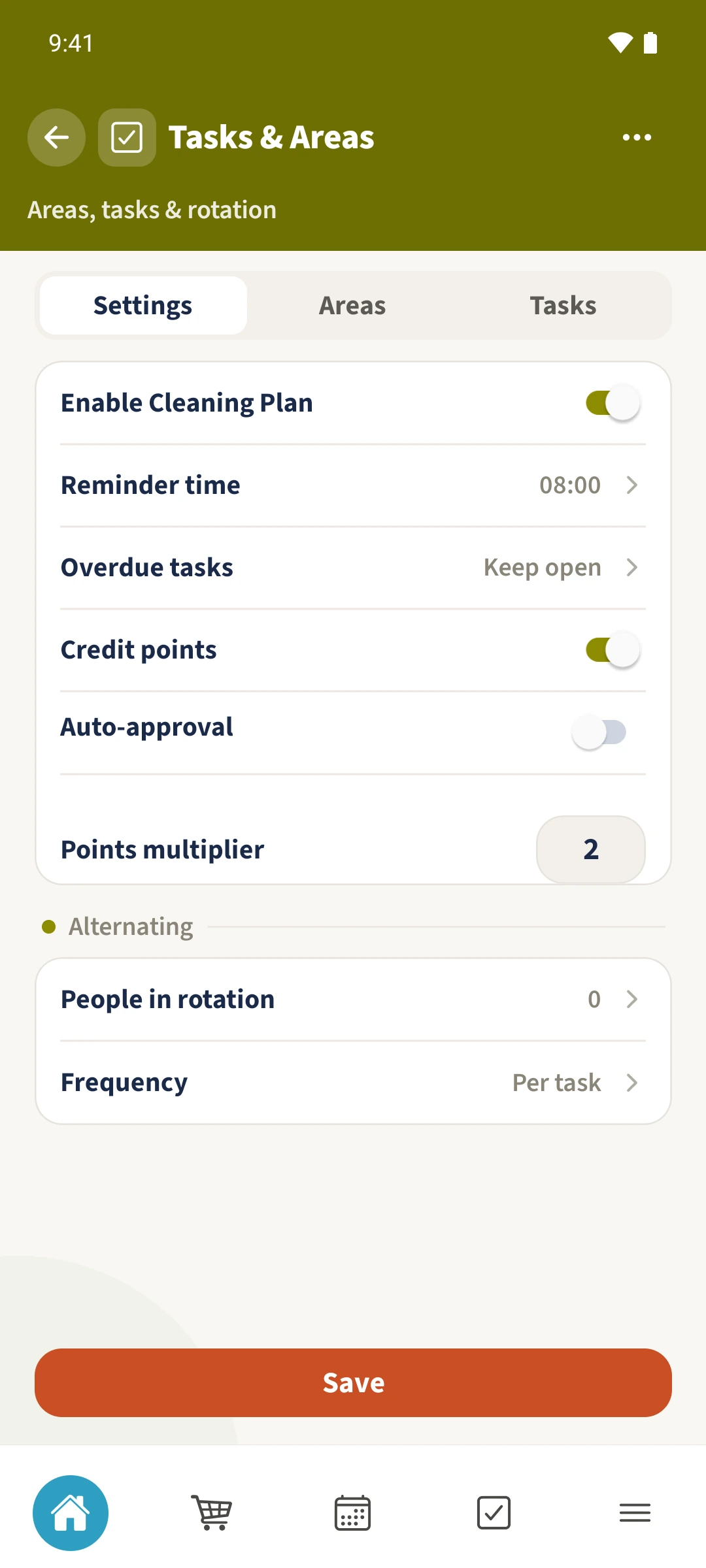
In Cleaning Plan settings, enable Credit points, leave Auto-approval off and set Points multiplier. Save. When the assigned person completes the cleaning task, a submission appears in the rewards Inbox. The example turns five task points into ten reward points after Daniel’s approval.
How the steps fit together
- 1
Set up the points link
Open Cleaning Plan settings. Enable Credit points, switch Auto-approval off and enter two for Points multiplier. Save the settings.
- 2
Complete the assigned task
Emma opens today’s Wipe the table assignment with five points and marks it done. Its reward submission offers ten points.
- 3
Review it in the parent Inbox
Daniel opens Kids Rewards and Inbox. He checks Emma’s Wipe the table submission for ten points and chooses Accept.
- 4
Check the credit
Emma opens History. Wipe the table appears with plus ten points. Her available balance rises from 15 to 25 points, while the existing eight minutes stay unchanged.